


The fact that your Internet subscription automatically renews every day is not unusual. In many cases, du prepaid users are looking for a fast way to cancel their du data plan before the renewal takes effect. Whatever the case may be, if you’ve subscribed to something you now don’t need or if you’ve subscribed by mistake, then it’s easy to cancel once you know how. In this guide, you will learn how to deactivate your daily data via the most current and available options, all from the ease of USSD, SMS, the du App, and customer support. You’ll also get details about what happens after cancellation, how you can see if cancellation was successful and what to do if it is not.
What is the Daily Data?
du Daily Data is a prepaid mobile internet package for users who only require mobile internet access for one day. Whereas standard packages for weekly or monthly existence, the obtainable amount of data is fixed and it holds 24 hours before the end of the day. If there is money in your account, the plan, it is automatically renewed every day. This is great for those who use it routinely but for many people this is missed and when they check their credit they get dismayed to see the money deducted daily from their credit. Fortunately, they have included a way of canceling the automatic renewal when you don’t need the service anymore.
Why Do People Cancel Their Daily Data Plan?
People want to cancel an internet plan on a daily basis for a number of reasons. There are a lot of users who choose to increase their monthly or weekly data plan as they provide better value. Some people use Wi-Fi for the majority of their use of the internet and forgo a mobile package altogether. Others use a daily bundle once and realize that its subscription just renews itself.
Common reasons include:
- Subscribing to an internet package that pays on a monthly basis.
- Avoiding day-to-day deductions from an entity’s account.
- Using another data offer.
- Minimizing unnecessary mobile costs.
- Preventing undesired auto-renewal.
How to Cancel the Daily Data Bundle
The easiest method depends on how your package was activated. du provides several official ways to unsubscribe.
| Method | Best For | Time Required |
| USSD Code | Quick cancellation | Less than 2 minutes |
| SMS | Easy for all users | 1–5 minutes |
| du Mobile App | Managing all services | Around 2 minutes |
| Customer Support | If cancellation fails | Depends on response |
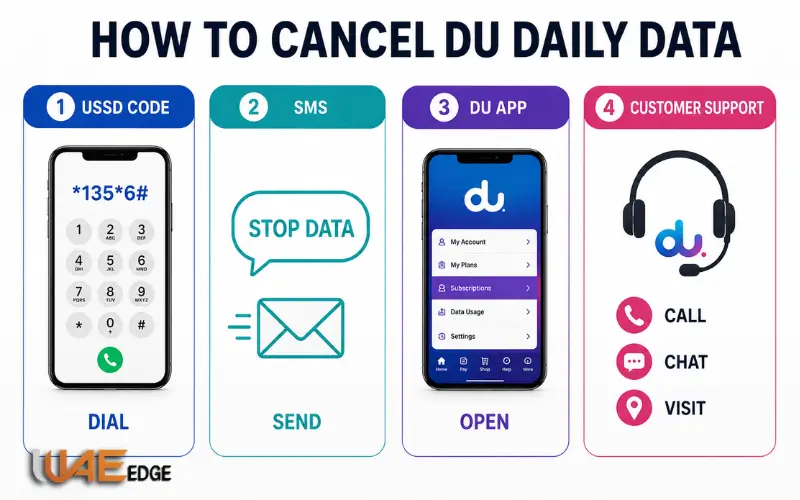
Method 1: Cancel Using USSD
The quickest method is via the USSD menus.
Dial:
*135*6#
Click on the on-screen menu to check your active subscriptions. Choose your day-to-day data bundle and pick the choice to deactivate or decline to be a component of. After processing, you’ll get an SMS message saying the package has been cancelled. Most Internet “bundle” plans that cost for a day of service will fall into this category.
Method 2: Cancel by SMS
Users like SMS features because there’s no need for internet access.
Send the following message:
STOP DATA
Send it to:
1355
A confirmation message should appear in your inbox in a matter of minutes telling you if the order has been accepted or not. If your package uses a subscription keyword different from the above, the SMS reply may contain further instructions.
Method 3: Use the du App
The official du application gives customers complete control over their mobile services.
Once you have signed in, click on Login. Log in and look at your current plans and subscriptions. Find an internet bundle you have created for daily use, and then select cancel or unsubscribe. Confirm and wait for the confirmation notification. The addition of these features, too, can be accomplished via the app, which also lets you watch how much more data is available, refill your allowance, and get more sub-orders whenever you want.
Method 4: Reach out to Customer Support
Customer support can cancel the subscription from your account if the above one fails.
Please reach out to du via:
- Don’t forget to use a du number for a phone call to 155.
- Join Live Chat within the du App.
- Go to a local du service centre.
- Reach out to customer service via the official methods.
Require representatives to testify in support and to get rid of any unwanted recurring data packages.
How to Confirm That the Package Is Cancelled
Once the cancellation is done, check whether or not the subscription was canceled. You can verify by simply checking:
- The confirmation will be available via SMS from du.
- Active Mobile App subscriptions.
- Remaining account balance after the next renewal time.
- Customer support confirmation.
If it isn’t deducted on the next day, your cancellation was successful.
What is Happening After Cancellation?
A lot of people are anxious about not being able to access the web as soon as they cancel. The current validity is valid until the currently valid 24 hours have passed, which is the case in most cases. After that, the service will no longer renew automatically. If your data is still valid, you can use it as long as the expiry time allows you to.
Can You Re-subscribe Later?
A daily package is not permanently removed if it is cancelled. You can re-use the same bundle whenever it is required, with the alternative activation system or via the alternative internet package if a different one is available that is more suitable for your usage. This would enable the customers to change the daily switches, weekly plans and monthly plans without any restriction and at any time.
Daily vs Monthly Data Plans
Many customers eventually move to longer-duration packages because they provide more data for a lower cost.
| Feature | Daily Plan | Monthly Plan |
| Validity | 24 Hours | 30 Days |
| Renewal | Daily | Monthly |
| Best For | Short-term use | Regular internet users |
| Cost Efficiency | Moderate | Better value |
| Balance Deductions | Every day | Once per month |
If you use mobile internet regularly, a monthly bundle generally offers greater savings.

Common problems in Cancelling:
On some occasions, customers think they cancelled a plan and continue one, since they are unaware of the cancellation.
Possible reasons include:
A request to cancel might not have been effected. There may also be a second Internet package in operation each day. They might need various forms of cancellation to go along with some of these promotional products. Processing delays in SMS may also be caused by rush hours. In such instances, you can look at your current subscriptions in the app or otherwise reach out to Customer Support, which should clear the situation up quickly.
Tips to Avoid Future Auto Renewals
Many users unintentionally subscribe to recurring data plans. There are some simple steps you can take to avoid needless deductions. Make sure to carefully read the confirmation message when activated as it will include information on whether the package is automatically renewable or not. Leave notifications on so that you’re reminded when they’re due for a renewal. Check on your current subscriptions often, particularly after entering special Internet offers. Checking your account periodically can help you avoid any unnecessary charges.
Final Thoughts
Learn how to deactivate du daily balance if daily deductions have become a bother so as to save money and any inconvenience you may experience. It only takes a few minutes to use the USSD menu, an SMS, the app and to reach the customer support team. Always check for a confirmation message and be sure to cancel the automatic renewal before completing the process. This will prevent your balance from continually getting deducted.
One of the simplest ways to avoid future charges for subscribing in the UAE is to manage the subscription regularly. Internet offers in UAE normally update their protocol and services regularly; they should be checked periodically in order to find the most suitable package for you. From heavy consumers to heavy streamers, having the right knowledge about the options out there in the UAE can help save you cash and enjoy instant access to a quality connection.
Also Visited:
How to Activate DU Data Offer 1 GB Per Day 28 Days
056 Du or Etisalat? 2026 Guide to Check Correct Network
Du 50 AED Prepaid Data Package (28GB)
FAQs
How to turn off du daily data?
To cancel a daily data subscription: call 135 by pressing *135*6#, pressing STOP DATA to 1355, either using he du App, or by contacting customer support.
Will my existing data cease immediately?
No. In most cases, your data is still valid until the 24 hours expire and only the auto-renewal is cancelled.
Does anyone have to pay to cancel the daily data plan?
No du does not levy any cancellation charges for unsubscribing from any eligible daily data bundles.
How to know if my daily data has been cancelled?
A confirmation SMS will be resend, or you can check the “Active subscriptions” in the du App.
Is there any possibility of getting the same package back later?
Yes. Subscription allows you to get your daily internet bundle again whenever you require it.
Why is my balance still being deducted after being cancelled?
This can occur if there is another recurring data package currently in existence, or if the data package couldn’t be cancelled.
Which of the following is the quickest way to cancel the package?
Typically, the fastest method of canceling the daily data bundle is by using the USSD code 135*6#.

