
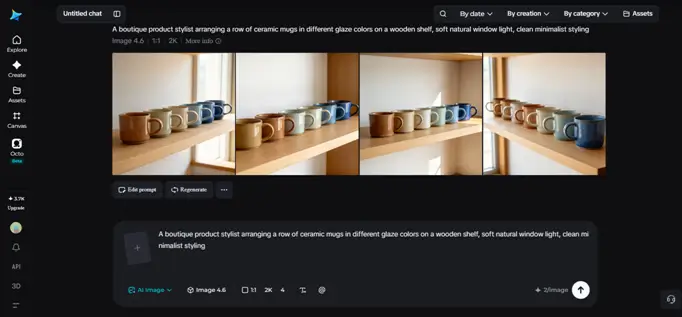
Launching a product line rarely means just one color or one finish — it means a whole range of options customers can choose from. The catch is that photographing every single variation separately is slow, expensive, and honestly unnecessary in the early stages. This is exactly where an AI image generator earns its keep, letting you produce an entire set of product variations from a single base concept.
Dreamina, powered by its most advanced image generation model, Seedream 5.0 Pro, makes this process remarkably efficient. One well-crafted prompt can become a whole catalog’s worth of colorways, finishes, and styles, all before a single physical unit exists. Here’s how to make that happen.
Why variation is a bigger deal than it seems
Customers rarely commit to a product based on one option — they want to see the range before deciding what fits them. For brands, that means every new SKU traditionally required its own photography, which adds up fast across a full product line. Being able to generate convincing variations digitally, before manufacturing is even finalized, changes the entire economics of launching a product range.
Planning your variation set before you generate
Jumping straight into generation without a plan usually leads to a messy, inconsistent set. It helps to map out your variations first:
- Decide which attribute is changing — color, material, pattern, or size
- Keep every other element of the product identical across variations
- Note which variations are must-haves versus nice-to-haves for your first pass
A little planning upfront saves a lot of regenerating later.
Keeping the base product identical across every version
The whole point of a variation set is that customers recognize it as one product family, just in different options. That means the base shape, proportions, and structure of your product need to stay locked across every generation, with only the specific attribute — say, color or texture — actually changing. Skipping this consistency is the fastest way to end up with a set of images that look like entirely different products rather than one cohesive line.
Your 3-step variation lineup with Dreamina
Here’s the exact workflow for generating a full set of product variations.
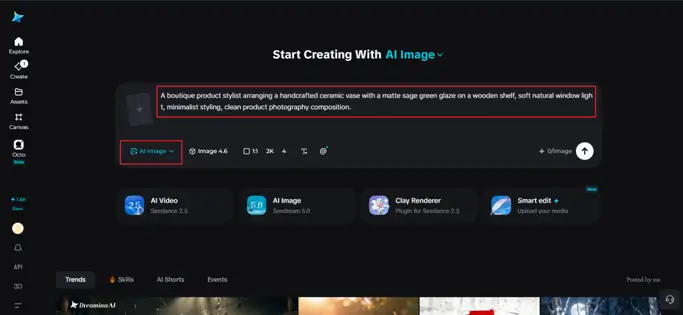
Step 1: Write a text prompt and/or add a reference image
Head to Dreamina and write a detailed text prompt describing a person dressed appropriately for the product styling context, along with the product itself in its first variation. Upload a reference image of your base product design so Dreamina has an accurate structural anchor to build each variation from.
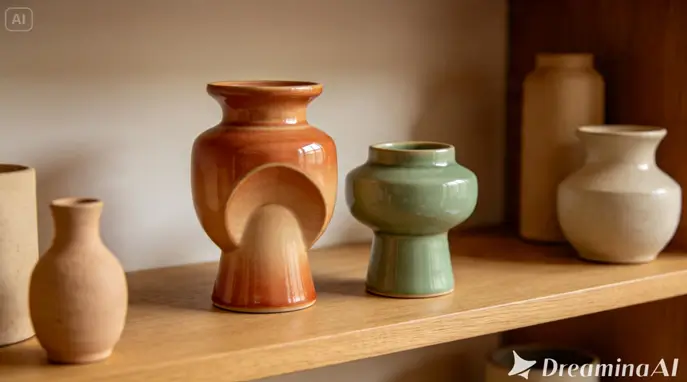
For instance: A boutique product stylist arranging a handcrafted ceramic vase with a matte sage green glaze on a wooden shelf, soft natural window light, minimalist styling, clean product photography composition.
Once this first version looks right, you’ll reuse the same structure and simply swap the color or material details for each new variation.
Step 2: Adjust parameters and generate
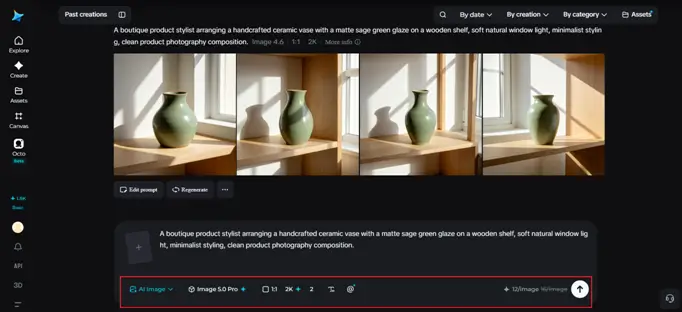
Before generating each variation, check your settings. Select Image 5.0 Pro, powered by Seedream 5.0 Pro, as your model, then choose your aspect ratio, image size, and resolution, using 1K while you’re testing different attribute combinations and 2K once you’ve settled on your final set. Click Dreamina’s generate icon for each variation, keeping your composition and lighting prompt language consistent throughout.
Step 3: Customize and download
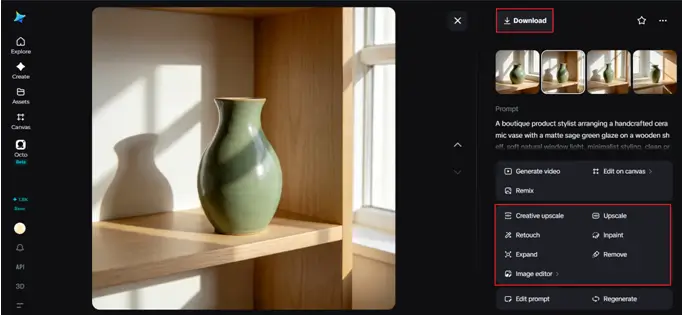
Once your variations are generated, use Dreamina’s AI customization tools to polish each one — inpaint to fix small inconsistencies between versions, expand to adjust framing if needed, remove to clean up any unwanted elements, and retouch to make sure lighting and texture feel uniform across the whole set. When each version is ready, click the Download icon to save your finished images.
Attributes worth experimenting with
Depending on your product category, a few variation types tend to be especially useful to generate early:
- Color and finish options (matte, glossy, metallic)
- Material swaps (wood, ceramic, fabric, metal)
- Pattern or print variations
- Packaging or label design differences
Testing these digitally first helps identify which options are actually worth producing physically.
Why Seedream 5.0 Pro keeps variation sets cohesive
Generating a believable variation set depends heavily on a model’s ability to preserve structure while changing only select attributes, and this is where Seedream 5.0 Pro stands out.
Its multi-layer visual control separates the product, background, and text into independent components, making it far easier to adjust color or material on the product layer alone without disturbing the surrounding scene.
The pinpoint precision editing tools, including point selection, lasso, sketch guidance, and regional controls, let you make targeted adjustments to color or texture with accuracy.
Its 2K output quality also ensures that fine material details, like a glaze’s sheen or a fabric’s weave, stay convincing across every variation, and its built-in online research helps keep trending finishes or materials looking current and on-brand.
Common questions about generating product variations
A few things that come up often when creators start this process:
- How many variations should I generate first? Start with 3 to 5 to test the workflow before scaling up
- Do I need a physical sample for every variation? No, digital variations work well for early testing and marketing
- Can I mix multiple attribute changes in one variation? It’s best to change one major attribute at a time for cleaner, more controllable results
Presenting your variation set effectively
Once you’ve got a strong set of variations, how you display them matters almost as much as the images themselves. Grouping them in a consistent grid, keeping the background and angle uniform across every version, and labeling each clearly all help customers compare options at a glance rather than getting confused by inconsistent presentation.
Final thoughts
A full product line doesn’t require a full photoshoot for every single option — just a solid base image, a clear plan, and the right AI image generator to build from. With Dreamina and its advanced Seedream 5.0 Pro model, you can generate a consistent, polished set of product variations that looks like one cohesive family, long before manufacturing decisions are locked in. Nail your base product, then let Dreamina handle the rest of the lineup!