


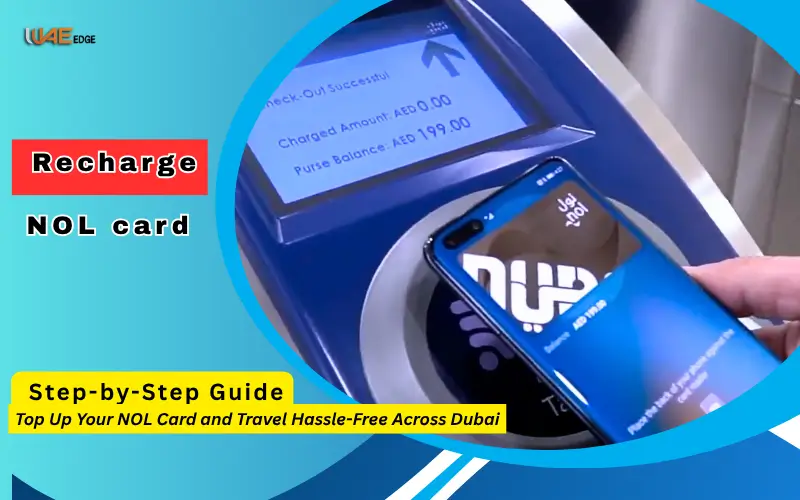
Dubai has one of the best public transport systems in the world. It offers seamless connectivity throughout the entire city. The NOL Card is at the core of the system, which allows for a fast, easy, and convenient commute. The NOL Card will ensure that your journeys are hassle-free, whether you use the metro, buses or trams.
By 2025, online top-ups or recharges of NOL cards will be the preferred method for both residents and visitors. This guide includes step-by-step instructions, FAQs, and tips to recharge your NOL card quickly and securely.
What is the NOL card?
The NOL Card, issued by Dubai Roads and Transport Authority RTA is a smartcard. The NOL Card is a smart card that acts as an electronic ticket for public transportation, replacing the requirement to purchase separate tickets or carry cash.
There are different NOL cards to suit the requirements of travelers.
- Red Ticket is designed for tourists or occasional users. It’s valid for up to 90 days and 10 journeys.
- Silver Card: This is the most common card among residents. It can be recharged and has a maximum of AED 5000.
- Gold Card offers Gold class travel on the metro for extra comfort.
- Blue Card is a personalized card that includes your personal information and photo. It’s ideal for corporate and long-term travel.
- Students can get a discount on their fares with the Purple Card.
NOL card is the most flexible travel card available in Dubai. It can be used on metro, trams, buses, waterbuses, taxis and selected services.
What is the importance of online recharge?
Online recharging of your NOL Card offers efficiency, convenience, and security. Online recharge is faster than manual topping up at kiosks or stations. You can add credit from your smartphone or PC.
Benefits of Online Payment:
- Save time by avoiding queues in metro stations.
- You can use your NOL card immediately after receiving an instant balance update.
- You can pay with credit/debit card, Apple Pay, Google Pay, and online wallets.
- You can track your spending by using online recharge.
- Supports multiple cards: You can manage and recharge up to five NOL Cards from a single user account.
How to recharge NOL card online: Step-by-step guide
In 2025, there are two ways you can recharge your NOL card online: through the RTA App in Dubai and the RTA official website.
Use the RTA App
RTA Dubai App, the official NOL Card management mobile app is available on Android and iOS. The RTA Dubai App is the official mobile application for managing NOL Cards.
How to recharge:
- RTA Dubai App can be downloaded from App Store for iOS or Google Play Store for Android.
- Log in to the app or create a brand new account.
- Click on the NOL Card.
- Choose Top-Up.
- Select your NOL Card if it is already associated with your account.
- Select the desired amount (minimum AED 10)
- Choose a method of payment, like Apple Pay or Google Pay.
- Confirm your transaction.
You can travel instantly after your NOL Card’s balance is updated.
Pro Tips for App Recharge:
- Connect multiple cards to manage family accounts or corporate accounts easily.
- Enable automatic top-up for a recharge that occurs automatically when your account balance drops below a threshold.
- Track your travels, whether they are daily commutes or vacations.
Use the RTA website
The official RTA Dubai site offers an alternative to online top-ups.
How to recharge:
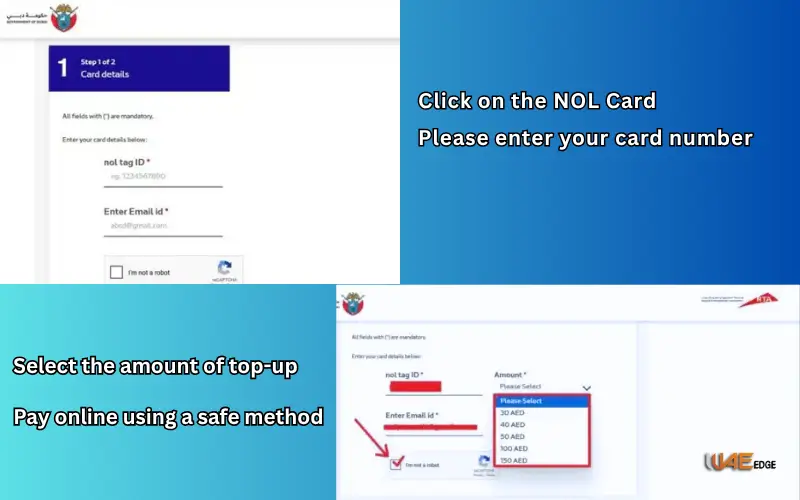
- RTA Dubai Official Website
- Click on the NOL Card.
- Please enter your card number.
- Select the amount of top-up according to your requirements.
- Pay online using a safe method.
- Your balance will be updated instantly after you confirm the transaction.
The desktop version is perfect for users who do not want to use the app or prefer desktop transactions.
Also Visit: How to Check NOL Card Balance| Dubai
Charge Limits: Minimum and Maximum
It’s vital to know the limitations when recharging your NOL card:
- Minimum Top-Up: AED 10
- Maximum Balance:
- Card Silver or Gold: AED 5,001
- Red Ticket depends on the number of trips you have purchased
A minimum of AED10 will ensure uninterrupted travel and prevent any hassle at the gates.
Avoid mistakes when recharging online.
- Incorrect Card Number: Check the NOL Card to ensure that you are not topping up the incorrect card.
- Waiting for confirmation: If you are not sure whether your transaction was successful, wait until the confirmation screen appears.
- Avoiding auto-top-up options: If you are a frequent traveler, it is important to enable the automatic top-up option.
- Red Tickets are not processed if they have been overloaded. Red Tickets come with a limit on the number of trips that can be made.
- Paying without security: Only use official channels, such as the RTA App and website.
Benefits of Charging Your NOL Card Online
It’s not only convenient, but it also offers greater safety and control.
- The station does not require cash.
- You can use your card instantly after you recharge it.
- Use Travel Anywhere to travel anywhere: Includes metro, trams, buses, and even water transportation.
- RTA verifies and encrypts all transactions.
- Expense tracking: Track spending, travels, and history of top-ups directly on your smartphone.
Smart Card NOL Management Tips
- Connect your card to the RTA App and track it easily. Instant recharge is also possible.
- For frequent commuters, enable Auto Top-Up to ensure that you never lose your balance.
- Track your expenses and keep track of them by updating the Travel History.
- For better security and to replace lost cards, use Personalized Cards.
- Check your balance regularly to prevent any problems during travel.
Conclusion
Online recharging of your NOL card in Dubai is quick, safe, and convenient. Online top-up is available for residents who commute daily, as well as tourists exploring the city.
You can recharge your cards anywhere and anytime using the RTA App. Maintaining your balance is crucial for stress-free travelling and allowing you to take advantage of all the public transportation services in Dubai.
Spending just a few moments to top up your NOL Card online can help you avoid long queues at the stations and ensure smooth travel throughout the city.
Also Visit:
How to Transfer NOL Card Balance to Another Card Latest Update 2025
FAB Balance check With Simple And Easy Methods
FAQs
How can tourists recharge their NOL Cards online?
You can reload your NOL card online using the RTA App and website.
What is the update speed of your balance?
After a successful purchase, the balance is updated instantly.
Can you top up multiple NOL cards at the same time?
The app does allow you to manage multiple cards from a single user account.
Q4 What payment methods are accepted?
App supports Apple Pay, Google Pay and other online wallets, including credit/debit cards.
Q5: Does online topping up have a fee?
Online top-ups through official RTA channels do not incur any service fees.
Q6. What is the minimum amount of top-up?
Minimum top-up is AED 10
Q7: Can I schedule automatic top-ups?
RTA App does allow automatic top-ups when your balance falls below a threshold.
Q8:How can I view my transactions?
RTA app shows all top-ups and journeys made in recent times, as well as any balance reductions.
Q9: How do I proceed if the online payment is unsuccessful?
The amount will not be deducted if the transaction is unsuccessful. Retry the transaction using another secure payment method.
Q10: What can I do to avoid paying the full fare?
Tap in or tap out at the correct stations and buses for the correct deduction of fares.