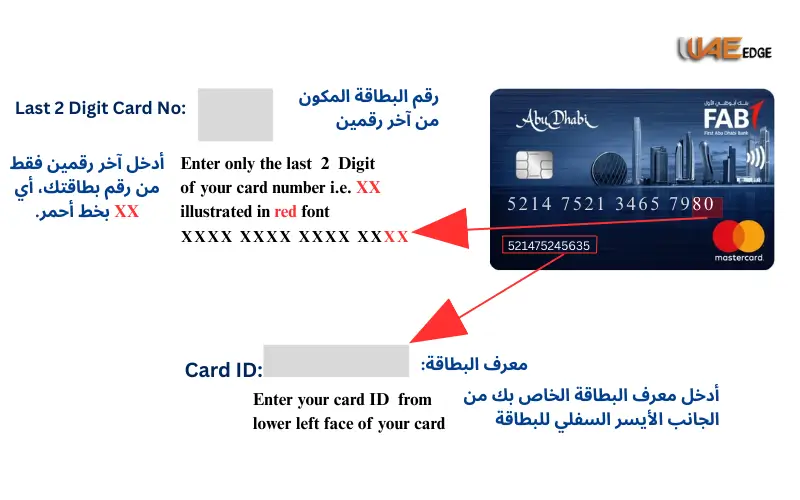



Automate Your Etisalat Bill Payments in 2026
Paying a bill every month is time-consuming, particularly when you have to place orders for several services such as mobile phone, home WiFi, or eLife TV. Etisalat by e& simplifies it by its AutoPay option, which enables you to pay your bills every month without worrying about forgetting.
In this guide, you’ll learn:
- What is Etisalat AutoPay, and how does it function?
- How to activate or deactivate it with the help of the Etisalat App or site.
- Checking and downloading Etisalat payment history. How to download and check your payment history with Etisalat.
- Security, card management, and billing Frequently Asked Questions.

What Is Etisalat AutoPay?
Etisalat AutoPay is an online automatic billing system that will automatically take the amount of your monthly bill and deduct it on the due date using your saved debit or credit card.
Etisalat AutoPay has several main features:
- Automatic deduction on your bill due date.
- Accepts Visa, MasterCard, and Apple Pay.
- Postpaid, Home W,iFi, and eLife customers are eligible.
- 100% safe – utilises PCI-DSS and 3D Secure codes.
- No setup fee or service charge.
💡 Consider that this is your financial advisor or helper in case of need: Etisalat AutoPay will maintain the services even in case you fail to make payments manually.
Must Visit: Etisalat Recharge Online Prepaid & Data Top-Up (2026 Guide)
How to Enable AutoPay on Etisalat App
AutoPay can be enabled easily by the My Etisalat UAE App – compatible with iOS and Android.
The following is the step-by-step setup process for 2026:
Step 1: Download & Log In
- Install the Etisalat UAE App (iOS or Android).
- Use your Etisalat number, email or Emirates ID to log in.
Step 2: Navigate to “Payments”
- On one of the home screens, tap on Payments or Bills.
- Choose the service that you would like to be automated (e.g., Mobile, Internet, eLife).
Step 3: Tap “Set Up AutoPay”
- Select AutoPay as a payment option.
- Add the information about your favorite payment card (Visa, MasterCard, or Apple Pay).
Step 4: Confirm Your Settings
- Choose the full amount automatically or limit (partial AutoPay).
- Check your AutoPay by an OTP verification.
Step 5: Save & Activate
After verification, your AutoPay will be activated during your subsequent billing cycle. You will get an email and SMS confirmation from Etisalat.
📲 AutoPay status can be checked at any time under Payments Manage AutoPay.
Alternative: Activate AutoPay on Etisalat Website
If you prefer desktop access:
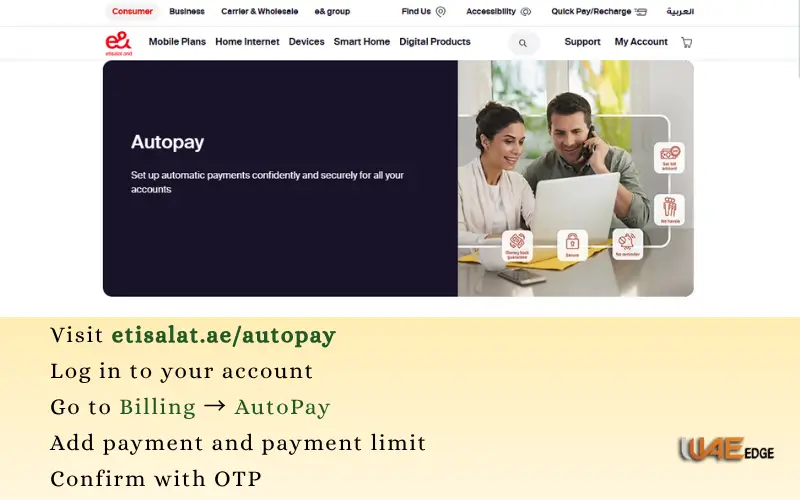
- Visit etisalat.ae/autopay
- Log in to your account.
- Go to Billing → AutoPay
- Add payment and payment limit.
- Confirm with OTP
That’s it! Automatic billing will occur at the next cycle.
How to View and Download Etisalat Payment History
Etisalat offers an excellent and comprehensive history of your past payment, which can be accessed at any time via the My Etisalat App or site.
This option comes in particularly handy when:
- Tracking expenses
- Getting proof of payments
- Operating family/business accounts.
Check Payment History via App
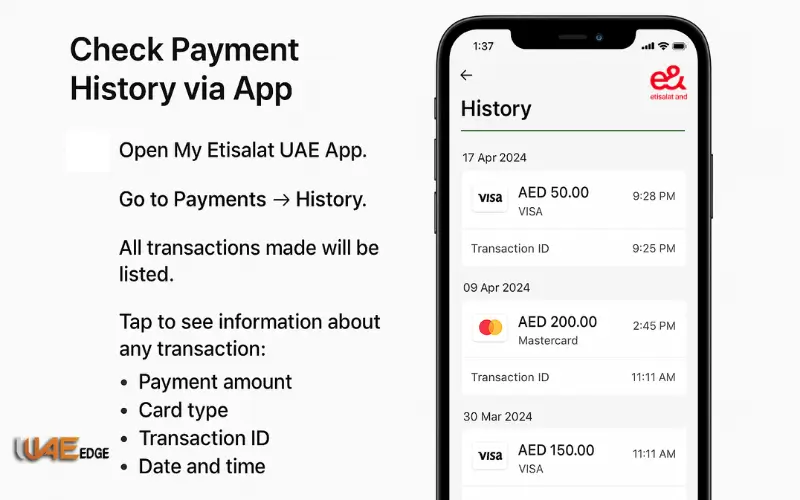
- Open My Etisalat UAE App.
- Go to Payments → History.
- All transactions made will be listed.
- Tap to see information about any transaction:
- Payment amount
- Card type
- Transaction ID
- Date and time
Download Payment Receipts (PDF)
In case you require receipts to do your accounting or taxes:
- Select Tap the transaction → Receipt (PDF)
- The file shall be stored in your device or sent to you via email.
Check History on Website
- Log in at www.etisalat.ae
- Click My Account Payments History.
- See or download your payment list in Excel or PDF.
Email Payment Summaries
Etisalat is also sending a monthly billing summary to your registered email. This option can be disabled or enabled in:
- Settings Notifications Email Alerts.
How to Cancel or Modify AutoPay Settings
AutoPay provides you with total control. You are free to take a break, cancel, or update your settings.
To Cancel AutoPay:
Via App:
- Open My Etisalat UAE App
- Click Payments: Manage AutoPay.
- Tap Deactivate AutoPay
- Confirm via OTP
Via Website:
- Log in at etisalat.ae
- Go to Billing → AutoPay
Click Cancel AutoPay deactivation will be confirmed through SMS and email.
To change AutoPay Limit or Card:
- Go to Manage AutoPay
- Tap Edit Settings
- Select Update Card Details or Set Payment Limit.
- Confirm your changes
💡 Multiple cards can be added, and one of them can be selected as primary to AutoPay.
Termination Following Cancellation
- Payments on future bills will not be automatic.
- You will have manual payment reminders through SMS/email.
- May still can always use Quick Pay or manually pay bills.
Must Visit: How to Pay Etisalat Bill Online in UAE 2026 Guide
Troubleshooting Common AutoPay Issues
| Issue | Possible Reason | Solution |
| Payment failed | Insufficient funds or expired card | Update card or pay manually |
| Duplicate charge | Delay in bank confirmation | Contact Etisalat support (101) |
| AutoPay not working | Not linked correctly | Re-enable AutoPay from the app |
| No SMS receipt | Disabled notifications | Enable alerts in Settings |
| Wrong card charged | Multiple cards active | Set correct primary card |
💬 For further help, you can use Etisalat Live Chat on their website or call 101.
Benefits of Automating Your Etisalat Bill Payments
AutoPay is convenient, reliable, and provides financial security. The following are the key benefits to the users in the UAE in 2026:
Never Miss a Payment Again
AutoPay on your bill means that it is paid automatically each month on schedule,, even when you are traveling overseas or are too busy to remember due dates.
Prevent High Late Fee or Suspended Service
Their failure to pay postpaid or eLife may result in overdue fees or disconnection. Auto Pay avoids that by making sure that the service is continuous.
Etisalat One Platform of all Services
You can manage all your Etisalat accounts, whether it is a mobile, eLife, or internet account, and you can do the AutoPay on each account, but with only one account.
Secure and Encrypted Transactions
Etisalat applies bank-level encryption and card tokenization, and therefore your card data is never displayed in plain-text or saved in plain-text.
Complete the History of full payment
All the transactions are registered to your account. You can always access or get your payment history to use it to pay your taxes, or as a business or record-keeping tool.
Cancel or Modify Anytime
You can choose what you want to do with your money – easily update or delete your AutoPay preferences at any moment.
✅ Ideal For:
- Postpaid customers seek no disruption.
- Customers of the Home WiFi/eLife option who want to have automatic renewal.
- Hurly and burly people or people on the go.
Tips to Manage Etisalat Payments Efficiently (2026)
✅ Make sure that you maintain your primary card.
✅ AutoPay recurrent bills, Quick Pay single recharge.
✅ Receive monthly budgeting receipts.
✅ Add email notifications to have full transparency.
✅ Check payment history after every two or three months.
Conclusion
Automation plays a vital role in convenience in the current hectic lifestyle of the UAE in the digital world. Etisalat AutoPay also means that you will never miss a bill – your service will be continuous, payments will be secure, and you will have full control.
Etisalat offers all the functions you require to handle your telecom services easily: automatic payments, billing history, etc.
Also read: Etisalat Quick Pay Instant Bill Payment & Recharge Guide for UAE Users
Check Etisalat Number Instantly Using Code App or Website
Frequently Asked Questions
Q1: Is Etisalat AutoPay Safe?
✅ Yes. Etisalat is bank-grade encrypted, 3D Secured, and stores your card in a tokenized place, so your card data is no longer visible.
Q2: Is It Possible to Use Multiple Card for as AutoPay?
Yes. You have the option of connecting more than one card and establishing a primary payment card in Manage Cards.
Q3: Am I Going to Receive Payment Notices?
Yes. You will get SMS and email notifications whenever a payment his made in terms of receipts and transaction IDs.
Q4: Is it possible to set AutoPay on Selected Services?
Yes. AutoPay can be turned on individually for certain accounts, such as mobile, home internet or Life.
Q5: What should I do in case of Card expiry or failure?
Etisalat will remind you through SMS to update your card details. To cancel the disconnection, you can also pay the bill manually by using Quick Pay.
Q6: What Do I Need to Do to Update My Card Information?
- Go to Payments → Manage Cards
- Tap Update Card → Add new details → verify OTP.
Q7: Does it allow me to stop the AutoPay at least?
Yes. Turn off Autopay in your settings. It can be reactivated at any time.